
How WEEX Copy Trading Works: A Setup and Strategy Guide for 2026
Copy trading allows a trader to automatically replicate the positions of another market participant in real time. When the lead trader opens a long position on BTC, your account opens the same. When they close it, yours closes too. The entire process runs without requiring you to monitor charts or execute orders manually.
WEEX includes a copy trading system that goes beyond a basic one-click approach. Rather than simply mirroring a lead trader's full strategy with no adjustment, WEEX provides a configuration layer where users can set specific parameters before activating a copy. This matters for risk management, and this guide covers how to use those settings correctly.
What Is Copy Trading on WEEX?
On WEEX, copy trading operates within the futures section of the platform. Users can browse a directory of lead traders, view their historical performance data, review their win rates and drawdown history, and choose to follow one or more of them. WEEX reports access to over 5,000 elite traders in its copy trading section.
Once a lead trader is selected and copy settings are configured, the process runs automatically. When the lead trader enters a position on a trading pair that falls within your configured parameters, WEEX opens a proportionally sized position on your account. When the lead closes, your position closes.
Who Should Use WEEX Copy Trading?
Copy trading on WEEX is most relevant for three types of users. The first group is traders who are still developing their strategy and want to observe experienced practitioners in real time through live position mirroring. The second is active crypto market participants who do not have time to monitor charts throughout the trading day. The third is account holders who want futures market exposure through a rule-based automated system rather than discretionary manual trading.
Copy trading is not passive investing. It involves leveraged derivatives positions that can produce significant losses. Users who are entirely new to futures markets should understand liquidation mechanics and margin requirements before allocating capital to copy trading.

How to Set Up Copy Trading on WEEX
-
Log in to your WEEX account and navigate to the Copy Trading section in the main menu.
-
Browse the lead trader directory. Use the available filters to sort by ROI, win rate, drawdown, and trading period.
-
Select a lead trader whose metrics match your risk tolerance. Review their full performance history before proceeding.
-
Click to configure your copy settings. Set your investment amount, leverage mode, eligible trading pairs, and any maximum loss threshold.
-
Review and confirm the configuration. Ensure your allocated capital does not represent more than you are comfortable losing in a single copy position.
-
Activate copy trading. The system will begin replicating the lead trader's positions according to your settings.
Key Settings to Configure Before You Activate
Investment Amount
This is the total capital you allocate to copying a specific lead trader. It controls how large each copied position is relative to the lead trader's position. Setting a smaller investment amount reduces both potential gain and potential loss on each copied trade.
Leverage Mode
WEEX allows you to configure leverage mode (isolated or cross margin) independently from the lead trader's own settings. Isolated margin is the recommended default for most users, as it limits the maximum loss on any individual copied position to the capital allocated to it. Cross margin uses your full account balance as collateral, which can reduce liquidation risk per position but exposes your entire balance.
Trading Pairs
You can specify which trading pairs your copy activation covers. Excluding pairs with low liquidity, high volatility, or assets outside your comfort zone is a practical risk management step that many users overlook.
Maximum Loss Threshold
WEEX allows you to set a loss cap that automatically halts copying if losses on a lead trader's positions reach a defined level. Setting this threshold is important because it prevents a single poor-performing lead trader from generating outsized losses before you notice and manually deactivate.

How to Evaluate a Lead Trader
WEEX provides historical performance data for each lead trader. The table below summarizes the key metrics and what each one tells you.
|
Metric |
What It Measures |
What to Look For |
|
ROI (%) |
Total percentage return over the displayed period |
Positive, consistent figure over at least 90 days. Avoid very high short-term spikes. |
|
Win Rate |
Percentage of closed trades that finished in profit |
Above 55% is reasonable. Above 70% sustained over months is strong. |
|
Max Drawdown |
Largest peak-to-trough account decline |
The lower this is relative to ROI, the better the risk-adjusted performance. |
|
Trade Frequency |
Average number of trades opened per day or week |
Very high frequency may indicate scalping, which has higher slippage risk. |
|
Trading Period |
How long the lead trader has been active on the platform |
Prefer traders with 3+ months of verifiable history over those with recent surges. |
Be cautious of lead traders whose ROI figures come primarily from very recent periods or from a small number of large wins. Multi-month consistency, controlled drawdown, and a reasonable win rate are more reliable indicators of repeatable performance than peak figures over short windows.
Risk Management Considerations
Following a lead trader does not eliminate market risk. Past performance data does not guarantee future results. Lead traders can change their strategy, increase their leverage, or trade through market conditions that are structurally different from their historical period.
-
Limit your total copy trading allocation to a portion of your account that you can absorb as a loss without material impact on your trading capital.
-
Avoid copying too many lead traders simultaneously without monitoring total position exposure across all of them.
-
Review your copy trading dashboard regularly rather than treating it as fully passive.
-
Set a maximum loss threshold for each lead trader you follow.
-
Understand that high ROI lead traders are often achieving those results with higher leverage, which also means higher drawdown potential.
Reducing Your Copy Trading Costs with TetherBack
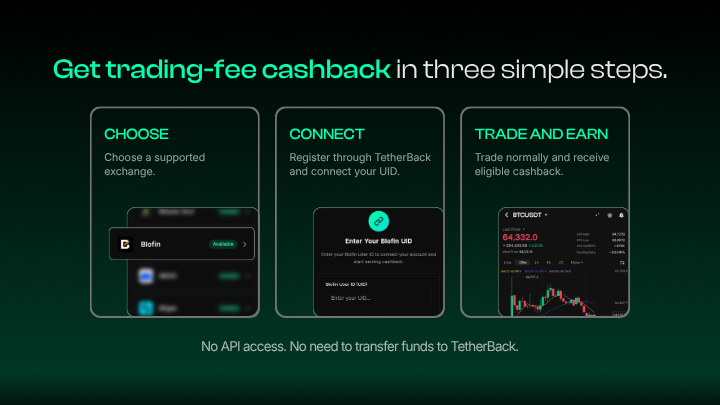
Copy trading on WEEX generates trading fees on every position opened and closed. For active copy traders following lead traders with high trade frequency, these fees accumulate meaningfully over a month. TetherBack's 65% cashback rate on WEEX returns 65% of those fees to you in USDT on a daily settlement basis.
To qualify, your WEEX account must be registered through the TetherBack partner link. The cashback applies to all fee-generating activity on your account, including fees generated by your copy positions.
Frequently Asked Questions
Can you copy trade on WEEX without KYC?
Yes. WEEX does not require KYC verification to access the copy trading feature. Users can activate copy trading after standard account registration.
What is the minimum investment amount for WEEX copy trading?
The minimum investment required to begin copying a lead trader on WEEX depends on the specific lead trader's minimum settings. Check the lead trader profile for the minimum threshold before activating.
Can I follow multiple lead traders at once on WEEX?
Yes. WEEX allows users to follow multiple lead traders simultaneously. When doing this, it is important to monitor total exposure and ensure that individual allocations are sized appropriately to avoid overlapping positions that exceed your intended risk.
How do I stop copying a lead trader on WEEX?
You can deactivate copy trading for any lead trader at any time through the copy trading management panel in your WEEX account. Open positions copied from that trader may remain until they are closed according to the lead trader's activity unless you choose to close them manually.
Does TetherBack cashback apply to fees generated by copy trading on WEEX?
Yes. Copy trading on WEEX generates trading fees on every position opened and closed. Since TetherBack's 65% cashback rate applies to fee-generating activity on your linked WEEX account, copied positions that generate fees will contribute to your daily cashback calculation.
Can I customize the leverage used in my copied positions?
Yes. WEEX allows you to configure the leverage mode for copied positions independently of the lead trader's settings. This is an important risk control, particularly for users who want to follow a lead trader's direction without replicating their full leverage exposure.
What happens to my copy trades if the lead trader stops trading or closes their account?
If a lead trader becomes inactive, their copy trading availability will typically reflect this. Any open copied positions will remain until they are closed either by the lead trader or manually by you. It is advisable to check your copy trading dashboard regularly for any changes in lead trader activity status.
Glossary
-
Copy Trading: An automated feature that replicates the live positions of a designated lead trader on the follower's account in real time.
-
Lead Trader: A WEEX user whose trading activity is available to be followed and automatically replicated by others in the copy trading system.
-
ROI: Return on Investment. A performance metric expressing profit or loss as a percentage of capital allocated.
-
Drawdown: The peak-to-trough decline in account value during a defined period, representing the worst loss experienced from a high point.
-
Win Rate: The percentage of trades closed at a profit relative to the total number of closed trades over a defined period.
-
Isolated Margin: A margin mode where the maximum loss on a copied position is limited to the capital specifically allocated to that position.
-
Cross Margin: A margin mode where the full account balance serves as collateral for all open positions, increasing liquidation protection per position but exposing the full balance.
-
Slippage: The difference between the expected price at which a trade is placed and the actual execution price, most common in fast-moving or low-liquidity markets.
-
Funding Rate: A periodic fee exchanged between long and short perpetual futures holders to keep the contract price aligned with the underlying spot price.
-
Trade Frequency: The number of trades a lead trader opens per unit of time, used to assess trading style and estimate expected fee exposure for copiers.
About TetherBack
TetherBack is a crypto cashback and rewards platform built for active traders who want to reduce effective trading costs. By partnering with supported exchanges, TetherBack shares a portion of trading fee revenue back to users in the form of cashback.
The platform does not hold user funds and does not operate as an exchange. Traders continue to execute trades directly on their chosen exchange while earning rewards through the partnership structure.
TetherBack focuses on cost efficiency, transparency, and providing traders with a structured way to maximize value from their existing trading activity.